
Creating an automated Language Translator in Power Apps Using AI Builder

In multilingual business environments, data consistency is one of the most underestimated challenges. When users work across languages, especially CRM and business apps, manual translation quickly becomes a bottleneck, introducing inconsistencies, user fatigue, and data quality issues. This blog will walk you through a real-world Canvas App solution that uses AI Builder’s prompt-based translation to… Continue reading Creating an automated Language Translator in Power Apps Using AI Builder

Generating QR Code via a direct API call

Problem Statement Power Apps does not have a built-in feature to generate QR codes. Because of this, creating QR codes from text or URLs inside the app becomes difficult and usually requires additional setup like connectors. Please follow the steps below to generate QR codes directly within Power Apps.   Step 1: Create a Blank… Continue reading Generating QR Code via a direct API call

Designing the Perfect List with Best Practices for Displaying Dataverse Data

Power Pages List is a data display UI component that connects to a Dataverse table in Dynamics 365. It displays data using views defined in Dataverse, allowing users to see multiple columns of real-time data. With Lists, you can apply filters based on conditions or the logged-in user. Additionally, standard out-of-the-box (OOB) functionality enables users… Continue reading Designing the Perfect List with Best Practices for Displaying Dataverse Data

Exploring the New Themes and Controls in Power Apps Canvas

Microsoft has rolled out new themes and modern controls in Power Apps Canvas Apps, enhancing the app-building experience with a more interactive and polished user interface. These modern controls also come with expanded event support, reinforcing Power Apps’ commitment to low-code development. Key controls such as Button, Gallery, and Data Table have undergone major improvements.… Continue reading Exploring the New Themes and Controls in Power Apps Canvas

New Era of Formula Fields: Replacing Calculated Fields in Dataverse and PowerApps

Formula columns in Microsoft Dataverse are special fields that display calculated values based on other fields within a table. These formulas use Power Fx. Power Fx is designed to be automatic.  One of the key advantages of Formula columns is that they leverage the same Power Fx functions used across various Microsoft platforms. This means… Continue reading New Era of Formula Fields: Replacing Calculated Fields in Dataverse and PowerApps

Paper to Power App: Creating a Canvas App in D365 CRM from a Hand-Drawn Sketch

Power Apps, known for its low-code/no-code capabilities, now offers the ability to create complete apps from an image. Sometimes, the best way to design an app starts with something as simple as a pen and paper. Whether you’re in a meeting, brainstorming with your team, or just working through ideas on your own, sketching out… Continue reading Paper to Power App: Creating a Canvas App in D365 CRM from a Hand-Drawn Sketch

Create apps from Figma in Power Apps

The ability to create PowerApps from Figma design files directly helps bridge the gap between design and development by accelerating the app UI development process. It allows developers and designers to collaborate effectively and efficiently to deliver great end user experiences with low cost and effort. Designers can create designs in Figma using the Create… Continue reading Create apps from Figma in Power Apps

Group by in Array/Collections in Power Automate/Logic Apps

Power Automate provides a versatile set of actions and expressions that allow you to craft logic to meet a wide range of requirements. You can utilize these capabilities for data processing, filtering, and sorting tasks, among others. The ‘Group By’ feature in Power Automate is a powerful tool that enables you to establish a new… Continue reading Group by in Array/Collections in Power Automate/Logic Apps

Side Pane in Model Driven App – Part1

There are some scenarios where users spend a lot of time in getting the overview of quick updates due to lack of understanding on where to navigate for accessing the respective dashboards, list, records, etc in the model-driven app. PowerApps has provided an efficient way to reduce this gap and users can comfortably access the… Continue reading Side Pane in Model Driven App – Part1

Microsoft Power Platform 2023 release wave 2 plan overview

Microsoft has announced the latest updates to the customers which are planned to be released during the period of October 2023 through March 2024 as a part of wave 2. Below are some of the features of Microsoft’s wave 2 which are more exciting to get started with. Let’s see what new features have been… Continue reading Microsoft Power Platform 2023 release wave 2 plan overview

Custom Dialog

Many times, there is a requirement to perform actions based on the user’s input in the Model-driven app. Though there are many ways to do this like, adding a field to the form and getting its response, but as it is a user-interaction process, it is needed to create a “Dialog box” that can be… Continue reading Custom Dialog

Performing CRUD Operations in Power Apps using any Data Source – Part IV

In the previous 3 blog parts, we have shown what data source we are using, Data Model View, how to connect to any data source in Power Apps, how to read data from any Data source, how to create records using the Patch method for column of any data type to perform CRUD Operations. In… Continue reading Performing CRUD Operations in Power Apps using any Data Source – Part IV

Performing CRUD Operations in Power Apps using SharePoint List – Part III

In the previous 2 blogs of Performing CRUD Operations in Power Apps using any Data Source (part 1 and part 2), we have shown what data source we are using, Data Model View, how to connect to any data source in Power Apps, how to read data from any Data source. In this blog, we… Continue reading Performing CRUD Operations in Power Apps using SharePoint List – Part III

Performing CRUD Operations in Power Apps using any Data Source – Part V

In the previous 4 blog parts, we have shown what data source we are using, Data Model View, how to connect to any data source in Power Apps, how to read data from any Data source, how to create records using the Patch method for column of any data type, how to update existing records… Continue reading Performing CRUD Operations in Power Apps using any Data Source – Part V

Performing CRUD Operations in Power Apps using SharePoint List – Part II

In the previous blog part, we have seen how to connect to any data source in Power Apps and perform CRUD operations using SharePoint List as an example. In this blog, let’s see how to read the data from any data source in Power Apps. Reading Data from Data Sources in Canvas Apps: In the… Continue reading Performing CRUD Operations in Power Apps using SharePoint List – Part II

Dynamics 365 Media and Entertainment Accelerator

The media and entertainment industries have better solutions available in the extended power platform common data model through the use of Dynamics 365 Media and Entertainment Accelerator. The fans and guests’ engagement are now easily manageable via out-of-the-box model driven and canvas apps. The accelerator provides the below features: Microsoft Teams is integrated with the… Continue reading Dynamics 365 Media and Entertainment Accelerator

Increase efficiency with the Dynamics 365 Government Accelerator

What is Microsoft Dynamics 365 Government Accelerator Microsoft Dynamics 365 Government Accelerator is a new tool designed to assist public sector and government entities in understanding and consuming data.   This first wave of the government data model supports policies, services, programmes, benefits, eligibility, licences, permits, grants, and more. It is accessible as an independent… Continue reading Increase efficiency with the Dynamics 365 Government Accelerator

Dynamics 365 Education Accelerator : Transforming Education Management

Dynamics 365 allows us to develop vertical solutions using industry accelerators. Accelerators are the extensions for the Microsoft Power Platform applications that provide the templates to suit the respective industry requirements. They provide most of the inbuilt functionalities so that the specific industries could leverage those features for their business requirements. In this blog we… Continue reading Dynamics 365 Education Accelerator : Transforming Education Management

Dynamics 365 Automotive Accelerator

As we know that Dynamics 365 Industry Accelerators are the vertical solutions supported on top of common data model to help the customers to easily configure their business requirements. Dynamics 365 Automotive Accelerators basically provide the features which can be leveraged by the dealers and the Original Equipment Manufacturers (OEMs) that includes automobile related deals… Continue reading Dynamics 365 Automotive Accelerator

Co Pilot from Microsoft

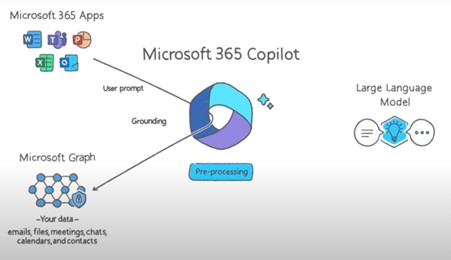
Microsoft Dynamics 365 Copilot offers interactive, AI-powered assistance in a variety of business processes. You can use this AI tool to analyze your data, then do things like find trends in specific data sets, create new sheets and charts based on that data, and even It even explains how it works and how to produce… Continue reading Co Pilot from Microsoft

Power Platform and Dynamics 365 based Industry Accelerators

We all know the no code/low code approach followed by Power Platform and Dynamics 365 among others has reduced the time it takes to deliver the solution to the end user. The industry accelerators developed on top of Power Platform reduce this time even further. These can be used on top of both Power Platform… Continue reading Power Platform and Dynamics 365 based Industry Accelerators

Performing CRUD Operations in Power Apps using Sharepoint List – Part I

Hello PowerApps Users,   PowerApps is in demand nowadays because of its remarking features such as: Speed of app creation. Power Apps accelerate app creation.   Low-code and no-code.  Microsoft and other third-party service integrations.   Business process automation.   Low cost of app ownership.   AI capabilities.   Cross-platform access and ease of deployment.  As a beginner in developing… Continue reading Performing CRUD Operations in Power Apps using Sharepoint List – Part I

Enable Offline Capability for Dynamics 365 Sales and Model Driven App

Sometimes the users of the model driven app will be required to update the data even if there is no connectivity to the application. This is needed when the users access the application in a remote place where they do not have the connection to the internet. In order to enable the app for offline… Continue reading Enable Offline Capability for Dynamics 365 Sales and Model Driven App

How to create a Horizontal Scrollable Gallery in Power Apps (Canvas Apps)

Hello Power Apps User. Let’s take a scenario in Canvas Apps. Suppose we want to display 6 columns in a Vertical gallery. Then, we can easily achieve it by the following steps:  Add Blank Vertical Gallery.  Add multiple labels/any other controls inside the gallery. Add necessary DataSource to the Items property of the Gallery and… Continue reading How to create a Horizontal Scrollable Gallery in Power Apps (Canvas Apps)

Rename multiple views easily in Dynamics 365 and PowerApps

In this blog, we will see how to rename multiple system views together using export import approach. Many a times, we come across a situation, where we rename entity. So, if we are renaming the entity, next obvious thing will be renaming the views as well. Now, if there are multiple system views then renaming… Continue reading Rename multiple views easily in Dynamics 365 and PowerApps

Low code! No Code! Then why code?

The no code/low code options are coming in, nice and easy. They don’t always make a big splash like the newest JavaScript framework. They don’t always give the open-source crowd nose bleeds that the newest JavaScript framework/newest language/newest stack/newest update of their favorite framework would do. The hard-core developers would scoff at these solutions especially… Continue reading Low code! No Code! Then why code?

New Alternative of Navigate() function on App.StartScreen and App.OnStart in Canvas apps

We were facing some issue when writing code of Navigation in App.StartScreen and App.OnStart of App within PowerApps. It is widely used for the initialization of global variables, prefetching of data into collections, and to determine which screen should be shown first. By default, the first screen shown when an app starts is the first… Continue reading New Alternative of Navigate() function on App.StartScreen and App.OnStart in Canvas apps

Embed Power BI reports in Power Apps Portal

We can now embed Power BI Dashboard/Reports in PowerApps Portal with few easy steps. Prerequisite:-    D365 Customer Service organization having a Global user with D365 and Power BI license. ENABLE POWER BI VISUALIZATION  In the PowerApps select the environment where you have provisioned the Portal. Go to Your Apps section from Power Apps home page and locate… Continue reading Embed Power BI reports in Power Apps Portal

Create and Configure model-driven app interactive experience dashboards

In this blog I will show you how to create and configure Interactive experience dashboards in model driven apps. The Interactive dashboards are fully configurable and security-role based and deliver information across multiple streams in real time. The Interactive dashboards have two forms: multi-stream and single-stream. Multi-Stream dashboards can be table-specific dashboards. The multi-stream dashboards… Continue reading Create and Configure model-driven app interactive experience dashboards

Do we need Dynamics 365 any more?

Microsoft introduced Power Apps a while ago. These can be considered a very small version of Dynamics 365. These apps can be developed quickly using almost the same methods that we use for Dynamics 365. In fact, as we all know, the apps available out of the box in Dynamics 365 are actually model driven… Continue reading Do we need Dynamics 365 any more?

Attaching media files from SharePoint to Dataverse Email records

I was wondering if we had any tools, workflow solutions, automatic processes or any connectors in PowerAutomate to support attaching the media files like images or videos from SharePoint folder to email messages before we send the emails. Basically, we wanted to automate the process of attaching the images and videos into the emails which… Continue reading Attaching media files from SharePoint to Dataverse Email records

Charts in PowerApps

In our previous blog we have learnt embedding of Power BI tiles in PowerApps. Now, in this blog we’ll learn Charts in PowerApps. Charts are used for graphical representation of data. It can usually be read more quickly than the raw data. In PowerApps there are below types of charts: Column Chart – A column… Continue reading Charts in PowerApps

Embedding PowerBI Tile in PowerApps

In our previous blog we have learnt embedding of PowerApps in Power BI report. Now, in this blog we’ll learn to embed PowerBI tiles in PowerApps. Let’s look at the steps required to add Power BI tiles in Power Apps. In PowerApps click on Insert tab. Click on Charts and then select Power BI tile… Continue reading Embedding PowerBI Tile in PowerApps

PowerApps And PowerBI Integration

Lets check out integration of PowerApps and Power BI in this blog. PowerApps and Power BI are pretty awesome tools by themselves. By combining them, we can potentially, achieve a lot more. By putting the PowerApp within the Power BI itself, we can give the user the ability to put in the data that he… Continue reading PowerApps And PowerBI Integration

Show LOOKUP field as dropdown in PowerApp & update value in D365 Sales

Recently, I got a case where I need to show a lookup field as dropdown in Canvas App and update its value in D365 Sales. I have searched a lot over the internet but failed. In my opinion, there is no handy material available for this problem at internet. So, after lots of struggle I… Continue reading Show LOOKUP field as dropdown in PowerApp & update value in D365 Sales

Dynamics 365 Teams License vs PowerApps Per Apps License

Edit: I would like to thank Ben Thompson for pointing out my mistake about licencing costs for Dynamics 365 Team member license. By now many of you are aware of how Microsoft has changed the Dynamics 365 Teams License. Microsoft now provides a dedicated app for users who hold this license. If a user has… Continue reading Dynamics 365 Teams License vs PowerApps Per Apps License

PowerApps Portal: Metadata and It’s Type Part – 4

In the previous blogs i.e, Part – 1, Part – 2 and Part – 3 we had covered what is metadata, how to add new metadata in Web Form and Entity Form and it’s types i.e., Attribute, Notes, Section and Subgrid. Now, in this part we’ll discuss the remaining types and their properties. Below is the list:… Continue reading PowerApps Portal: Metadata and It’s Type Part – 4

PowerApps Portal: Metadata and It’s Type Part – 3

In the previous blogs i.e., Part – 1 and Part – 2 we had covered what is metadata, how to add new metadata in Web Form and Entity Form and it’s types i.e., Attribute, Notes and Section. Now, in this part we’ll discuss ‘Subgrid’ and it’s properties.  Subgrid Selecting ‘Type’ as ‘Subgrid’ allows us to… Continue reading PowerApps Portal: Metadata and It’s Type Part – 3

PowerApps Portal: Metadata and it’s type – Part 2

In the previous blog we had covered what is metadata, how to add new metadata in Web Form and Entity Form and also from it’s 6 types we had covered the very first type i.e., “Attribute”. Now, in this part we’ll discuss below types and their properties: Notes Section Let’s start with type “Notes”. NOTES… Continue reading PowerApps Portal: Metadata and it’s type – Part 2

PowerApps Portal: Metadata and it’s type – Part 1

The Web Form Metadata contains additional behavior modification logic to augment or override the functionality of form. It allows portal admin to further configure entity forms and web forms such as predefined values and enhancing fields. In this blog, we are going to cover the very first type of metadata property i.e., “Attribute” with it’s properties… Continue reading PowerApps Portal: Metadata and it’s type – Part 1